Clinical and anatomic pathology consultations
The Consultations page gives you contact information to call or email a specialist about test results in these areas:
-
Consult with an anatomic pathologist using Zoetis Reference Labs Anatomic Pathology about your histopathology report.
-
Consult with a clinical pathologist using Zoetis Reference Labs Clinical Pathology about a cytology report or pathologist review.
-
Consult with an Imagyst™ clinical pathologist using Vetscan Imagyst™ a about a digital cytology (Vetscan Imagyst™) report.
To start a consultation on your results, follow these steps:
-
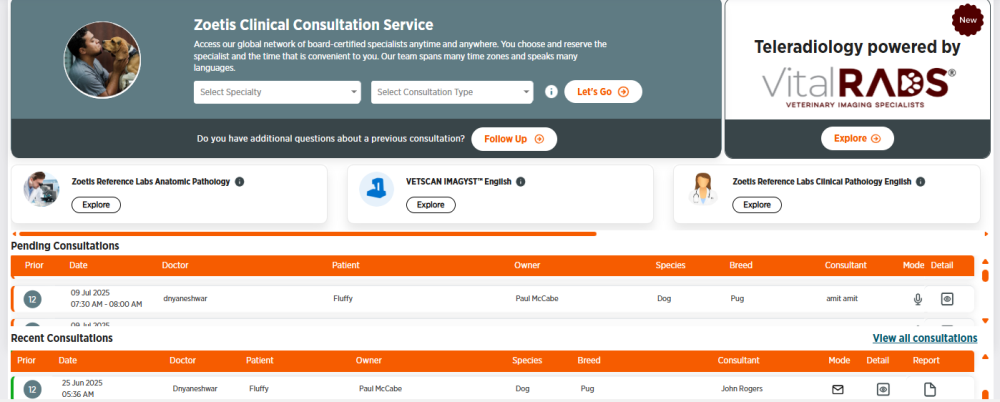
Choose Consultations from the side menu.
-
Click Explore under Zoetis Reference Labs Anatomic Pathology, Zoetis Reference Labs Clinical Pathology, or Vetscan Imagyst™.
-
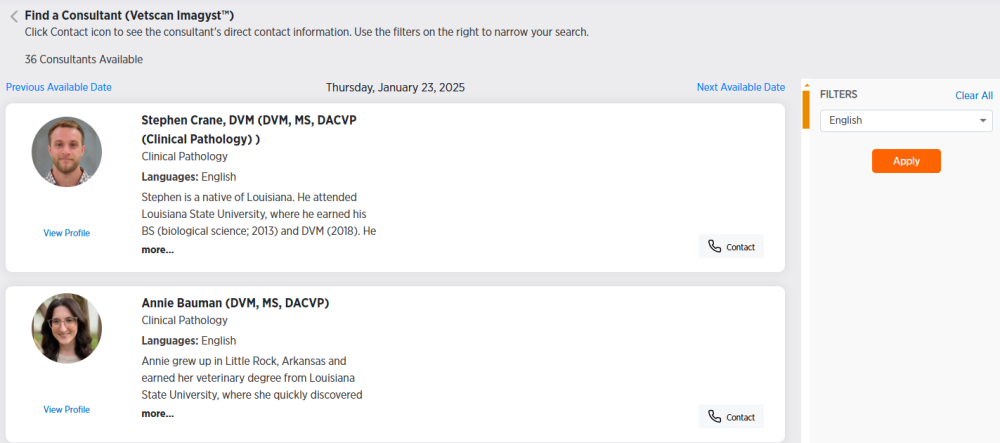
You will see a list of all specialists available for the current date. If you want to contact a consultant on a future date, click Next Available Date for future dates.
-
Use the Filters section on the right to filter consultants by languages spoken.
-
To filter by language, choose a language, then click Apply.
-
To clear filters, click Clear All.
-
-
Click View Profile under any consultant's photo or more... under their biography to view more information about the consultant.
-
Click Contact to get the phone number and email for a consultant.
-
Click OK to exit the contact information or profile screens.