Scheduling a Zoom consultation
You can set up a Zoom consultation to consult with a veterinary expert about one of your patients in a Zoom audio or video conference. When scheduling a consultation, include as much information as possible to get the best advice from your consultant. Follow these steps to schedule a Zoom consultation.
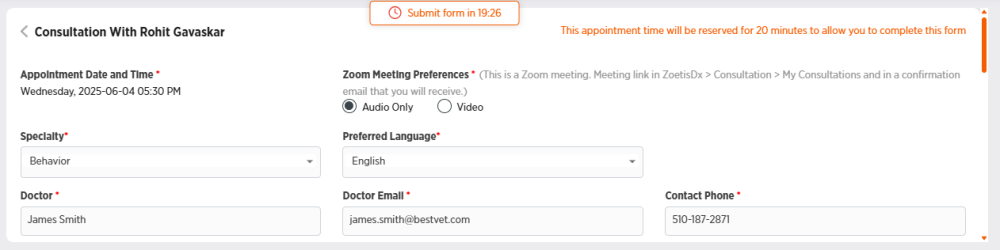
Note: If you do not click Schedule Appointment within 20 minutes of loading the consultation information form, the form will expire and you will have to start over.
-
Choose Consultations from the side menu.
-
Choose the specialty for the consultation.
-
Choose Schedule Zoom Appointment.
-
Click Let's Go.
-
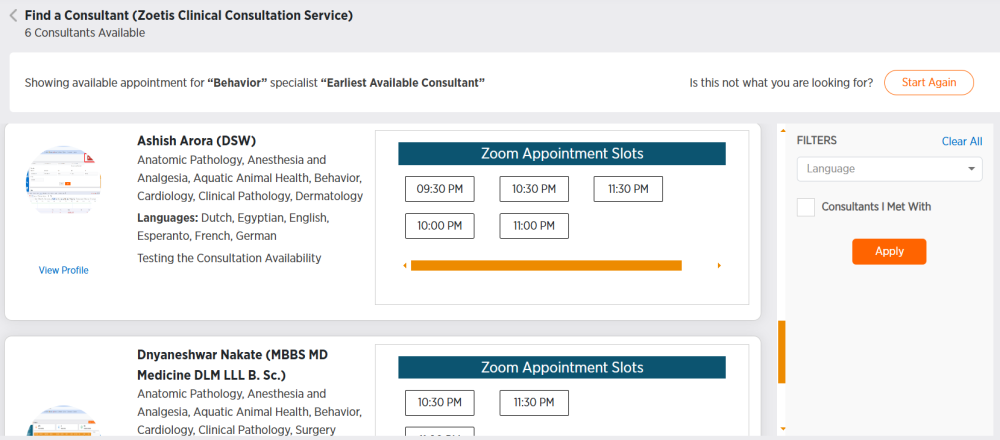
Review the available consultants. The list is sorted by the earliest available consultant to the latest available consultant. Click View Profile to view a consultant's profile.
-
You can filter consultants using the FILTERS section on the right side of the screen. Choose a Language to filter by language or select Consultants I Met With to display only consultants that you have met with previously, then click Apply. Click Clear All to clear your filters.
-
-
Click a time for the consultation. The times available for each day appear in chronological order. To view consultants and times available on future days, click Next Available Date.
-
Click OK to acknowledge the number of consultations you have remaining.
-
Confirm the doctor and appointment date and time are correct in the upper-left corner of the consultation information form.
-
Fill out the consultation form as desired. You have 20 minutes to complete the form. Fields marked with a * are required.
-
You can either enter patient information or search for a patient to bring up patient information by typing in a minimum of 3 characters in the Search field.
-
Click in the dotted circle to attach documents.

Browse to select a document, then click Open. You can click to view your document or
  to delete it.
-
-
Click Schedule Zoom Appointment to schedule the appointment.
-
Check your email for an appointment confirmation. If you do not receive the email, check your spam or junk email folder.
-
Use the Zoom link in the email to attend the appointment at the scheduled time.