Inactivating and reactivating users
You can inactivate ZoetisDx users so that they can no longer access their account. You can also reactivate them at a later time.
Making a user inactive
Follow these steps to change an active user to inactive so that they can no longer access ZoetisDx.
-
Choose Users from the side menu.
-
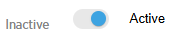
Click the blue circle in the toggle switch to the right of the user's name.
-
Click Yes.
-
The blue circle will move to the inactive side of the toggle switch and the user will be inactivated.
Reactivating a user
Follow these steps to make an inactive user active again.
-
Choose Users from the side menu.
-
Click the blue circle in the toggle switch to the right of the inactive user's name.
-
Click Yes.
-
The blue circle will move to the active side of the toggle switch and the user will be able to access ZoetisDx.