Viewing test details
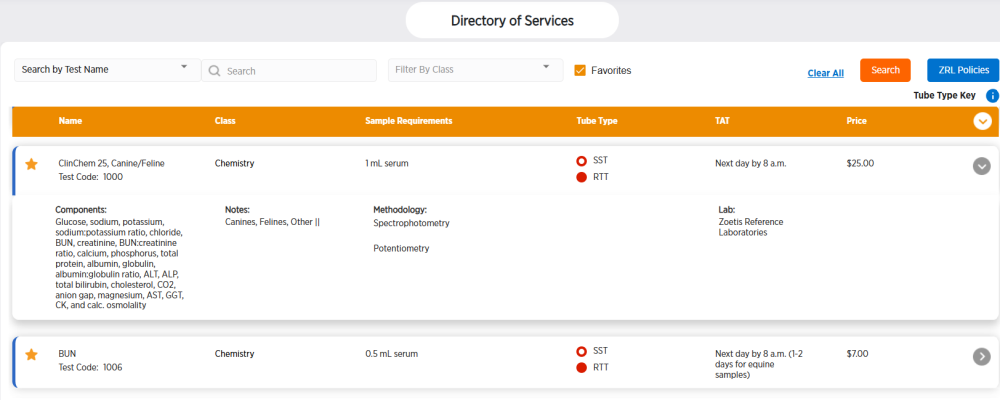
You can view details about all Zoetis Reference Laboratories (ZRL) tests on the Directory of Services page.
-
Use the filter fields at the top of the test list to filter tests.
-
 is test that has been marked as a favorite. Favorite tests will appear first when you filter by Favorites.
  is a test that has not been marked as a favorite.
 -
To view the details of a specific test, click
 to the right of the test.
 -
To view the details of all tests shown, click
 at the top right of the test table.
 -
Hold your cursor over
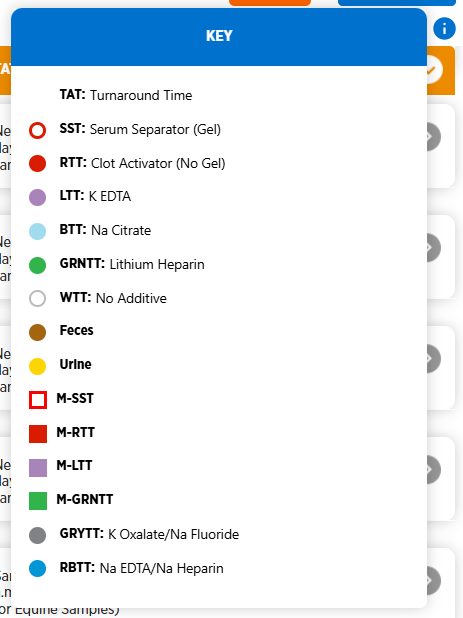
 to the right of Tube Type Key at the top of the tests list to see a key to the tubes required for each test. Abbreviations and a colored shape are displayed to represent the type of tube. See the Tube guide for detailed information about test tubes required.