Viewing consultation details
To view the details of a consultation, follow these steps:
-
Click Consultations in the side menu.
-
Click
 in the detail column of the desired consultation. If you cannot find your consultation in the Pending or Recent sections of the Consultations page, try viewing all consultations or filtering consultations.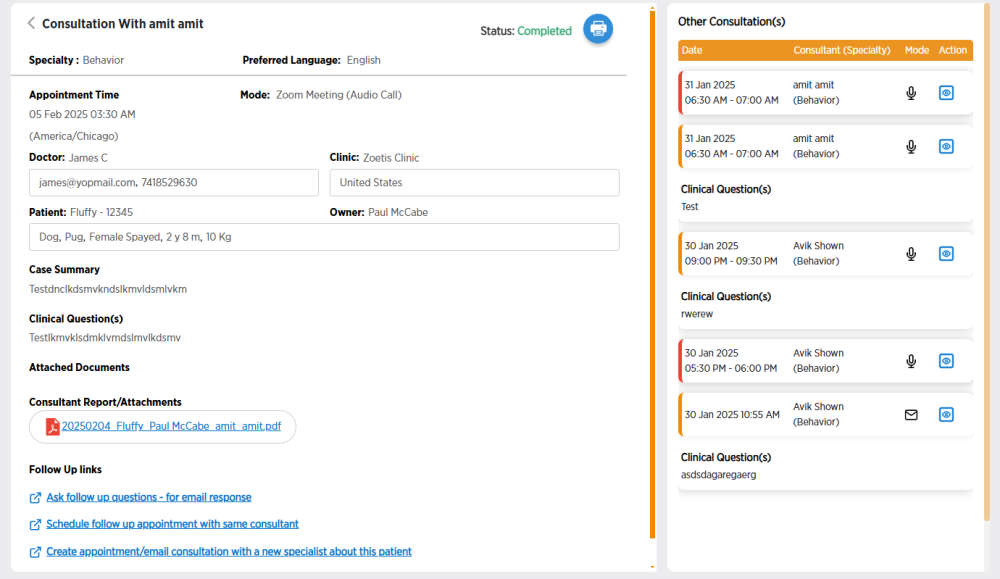
-
Review consultation details.
-
If the consultation is pending, you can use the links to reschedule or cancel a consultation.
-
If it's time for your Zoom consultation, you can click
 to join the Zoom meeting.
 -
On the right side of the screen, you will see other consultations for the same patient. You can click
to view the details for each of those consultations. -
If there are attachments to the consultation, you can click on their file name to download them to your computer.
-
Once your consultation is complete, you will find the consultation report with the attachments. Click on the report title to download it to your computer as a PDF.
-
If the consultation is complete, you can click
 to download the consultation details to your computer.
 -
If the consultation is complete, you can click use the links to ask follow-up questions or schedule a follow-up consultation.
-
-
When you are done reviewing consultation details, click
 to go back to the Consultations page.